
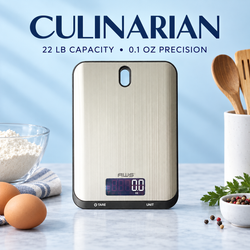
The best precision scale for portion control should deliver consistent measurements without making everyday food preparation unnecessarily complicated. It needs enough capacity for the foods and containers you use, a suitable resolution, a dependable tare function, and a platform large enough to support plates or bowls without blocking the display.
For most portion-control tasks, 1-gram resolution is sufficient. A scale with 0.1-gram resolution can be beneficial when measuring smaller ingredients such as nuts, seeds, cheese, spices, coffee, and condiments. A 0.01-gram model is generally unnecessary for complete meals and may sacrifice capacity and platform size for detail you do not need.
Precision is valuable, but it must be practical. A scale that displays tiny increments is not useful if your plate exceeds its capacity, the bowl touches the countertop, or the controls are hidden beneath the container.
This guide explains the features that matter most when choosing a precision scale for portion control—and which specifications may sound impressive without improving your results.
What Is a Precision Scale for Portion Control?
A precision scale is a digital weighing device designed to display relatively small changes in mass. In food preparation, the term may refer to a scale with a resolution of 1 gram, 0.1 gram, or even 0.01 gram, depending on its intended application.
A precision scale can help you:
-
Divide recipes into equal servings
-
Weigh foods more consistently
-
Measure small ingredients
-
Compare portions with Nutrition Facts labels
-
Follow recipes written in grams
-
Track serving sizes
-
Portion snacks
-
Reduce visual guesswork
-
Reproduce meals more consistently
The right format depends on whether you primarily weigh full plates, individual ingredients, or very small quantities. American Weigh Scales offers both general digital kitchen scales and more specialized precision balance scales for different weighing requirements.
Precision, Resolution, and Accuracy Are Different
These terms are often used interchangeably, but they describe different aspects of scale performance.
Resolution
Resolution is the smallest increment shown on the display.
A scale may display weight in increments of:
-
1 gram
-
0.1 gram
-
0.01 gram
-
0.001 gram
A scale with 0.1-gram resolution can show 125.4 grams, while a 1-gram scale may display the same load as 125 grams.
Accuracy
Accuracy describes how closely the displayed result agrees with the actual mass.
A scale could display 125.4 grams consistently while the true mass is 127 grams. It has fine resolution but poor accuracy.
Precision
Precision commonly refers to the consistency and detail of measurements. If the same item produces nearly identical readings repeatedly, the scale demonstrates good repeatability.
For practical portion control, you want an appropriate combination of accuracy, resolution, and repeatability. More decimal places alone do not guarantee better performance.
Feature 1: The Right Resolution
Resolution is one of the first specifications shoppers notice, but finer is not always better.
One-Gram Resolution
One-gram resolution is appropriate for most everyday portions, including:
-
Meat
-
Poultry
-
Fish
-
Rice
-
Pasta
-
Potatoes
-
Vegetables
-
Fruit
-
Bread
-
Complete meals
If your target portion is approximately 150 grams of chicken, seeing 149 or 151 grams is generally enough. A display showing 149.37 grams is unlikely to change how you prepare or record that meal.
A stable whole-gram result is often easier to use than a constantly shifting decimal reading.
0.1-Gram Resolution
A 0.1-gram scale is useful when your portions or ingredients are relatively small.
It can be helpful for:
-
Nuts
-
Seeds
-
Grated cheese
-
Coffee
-
Spices
-
Condiments
-
Baking ingredients
-
Smaller snacks
-
Ingredient testing
This resolution offers additional detail without necessarily reducing capacity to the very low levels associated with laboratory-style scales.
The Barista 3-kilogram coffee and kitchen scale is listed with a 3-kilogram capacity and 0.1-gram readability, illustrating a useful balance between detailed measurements and practical kitchen capacity.
0.01-Gram Resolution
A resolution of 0.01 gram is normally unnecessary for complete portions. It is better suited to very small quantities.
Scales with this level of readability may be more sensitive to:
-
Air currents
-
Countertop vibration
-
Temperature changes
-
Static electricity
-
Food movement
-
Off-center loading
Choose 0.01-gram resolution only when your normal task genuinely requires measurements at that level.
Feature 2: Appropriate Maximum Capacity
Maximum capacity is the total physical weight a scale can support. It includes the container, even after the tare button resets the display to zero.
Up to 500 Grams
This range can work for spices, coffee, nuts, seeds, and small ingredients. It is generally too limited for complete meals because a plate or bowl may consume most of the capacity.
1,000 to 2,000 Grams
A 1- to 2-kilogram scale can handle individual ingredients, snacks, protein portions, and lightweight containers. It may be useful when counter space is limited.
3,000 to 5,000 Grams
This is the most versatile range for many portion-control applications. It can accommodate:
-
Full meal plates
-
Meal-prep containers
-
Mixing bowls
-
Multiple servings
-
Heavier dishes
-
Medium recipes
More Than 5,000 Grams
Higher capacity is useful for bulk meal preparation, family recipes, heavy cookware, and large batches.
The Neptune 5-kilogram kitchen scale represents the type of higher-capacity format suited to larger bowls and everyday kitchen weighing.
Always leave capacity headroom. If your heaviest expected combination of food and container is 4,500 grams, a scale rated for exactly 5,000 grams leaves very little margin for a larger recipe or accidental overload.
Feature 3: A Dependable Tare Function
Tare is essential for portion control because it subtracts the container from the displayed result.
To use it:
-
Place the scale on a stable surface.
-
Turn it on and wait for zero.
-
Put the empty plate or container on the platform.
-
Press tare.
-
Confirm that the display returns to zero.
-
Add food.
-
Record the food weight.
Tare also lets you weigh several ingredients in one container. After recording the first ingredient, press tare again and add the next.
However, taring does not remove the container from the scale’s physical load. If a bowl weighs 800 grams and the scale has a 2,000-gram capacity, only 1,200 grams of capacity remains for food.
A good tare function should respond quickly and return the display to a stable zero without requiring excessive button pressure.
Feature 4: Repeatable Measurements
Repeatability is often more useful than an extra decimal place. A good scale should provide the same or a closely comparable result when the same item is weighed repeatedly under unchanged conditions.
You can perform a simple check:
-
Place a stable object in the center of the scale.
-
Record the measurement.
-
Remove the object.
-
Wait for the display to return to zero.
-
Replace the object.
-
Repeat five times.
Large changes may indicate:
-
An uneven surface
-
Low batteries
-
Air movement
-
Vibration
-
Calibration problems
-
Temperature instability
-
Damage to the sensor
Reliable repeatability makes it easier to divide meals and compare portions from one day to the next.
Feature 5: Calibration Capability
Calibration compares the scale’s reading with a known reference mass. A compatible scale can then adjust its measurement response.
Calibration may be appropriate:
-
When the scale is new
-
After transportation
-
Following a drop or impact
-
After major temperature changes
-
When readings appear inconsistent
-
When a suitable test weight produces an unexpected result
The general calibration process is:
-
Place the scale on a hard, level surface.
-
Allow it to reach room temperature.
-
Turn it on with an empty platform.
-
Enter calibration mode according to the manual.
-
Confirm the required reference mass.
-
Place the correct weight in the center.
-
Wait for confirmation.
-
Remove the weight and exit calibration mode.
-
Test the result again.
Use only the calibration mass specified by the manufacturer. A food package labeled 500 grams is not a certified 500-gram reference. Product fill, packaging, and moisture can all affect its actual total weight.
AWS offers calibration weights and accessories for compatible weighing equipment.
Measurement accuracy depends on more than the adjustment itself. The National Institute of Standards and Technology’s Office of Weights and Measures provides broader information about dependable measurement and weighing standards.
Feature 6: Practical Platform Size
A precision scale must physically accommodate your containers. A platform can have enough capacity but still be too small for comfortable use.
An oversized plate may:
-
Cover the display
-
Block the tare button
-
Tip or shift
-
Make centering difficult
-
Touch the countertop
-
Produce an incorrect result
A container may extend beyond the platform if it remains stable and does not touch another surface. The entire load must be supported by the scale.
Before buying, measure the base of your usual plate, bowl, or food container and compare it with the scale’s platform dimensions. Also check whether the display remains visible when the container is in place.
Feature 7: Useful Weighing Units
The most useful units for portion control are:
-
Grams
-
Ounces
-
Kilograms
-
Pounds and ounces
Grams are often the simplest option. They produce straightforward whole-number measurements and align with many recipes and nutrition databases.
Make sure the unit indicator is easy to see. Accidentally recording ounces as grams can create a substantial tracking error.
Some scales offer liquid-volume modes. Remember that a scale directly measures mass, not volume. A grams-to-milliliters conversion depends on the liquid’s density. Water, oil, syrup, and milk do not all have the same relationship between mass and volume.
Feature 8: A Clear, Visible Display
The display should be readable from your usual working position and remain visible with a plate or bowl on the platform.
Look for:
-
Large digits
-
Good contrast
-
Backlighting
-
A clear unit indicator
-
A stable-reading symbol
-
Logical warning messages
An angled or extended display can be helpful when weighing with large containers.
A bright display should not come at the cost of unreasonably short battery life. Automatic shutoff can preserve power, but the timer should be long enough to avoid interrupting food preparation.
Feature 9: Fast Stabilization
A precision scale should settle promptly after food is placed on the platform.
Slow or constantly changing readings can make portioning frustrating. Some movement is normal when:
-
Liquid is still flowing
-
Food is shifting
-
A bowl is wobbling
-
The countertop is vibrating
-
Air is moving across a fine-resolution scale
Once the load is stable, however, the display should produce a clear result.
A higher number of displayed decimals can sometimes create the appearance of better performance while producing more visible fluctuation. Choose resolution that matches the task and environment.
Feature 10: Easy Cleaning
Portion-control scales are exposed to food crumbs, moisture, oil, flour, and raw ingredients. A smooth platform and simple controls are easier to clean.
Helpful design characteristics include:
-
A flat weighing surface
-
Minimal seams
-
Wipeable buttons
-
A removable bowl or tray
-
Controls positioned away from the food
-
A platform resistant to normal kitchen staining
Do not immerse the scale unless its manufacturer specifically states that the model is waterproof or washable. Wipe spills promptly and prevent liquid from entering the display, buttons, or battery compartment.
AWS provides additional guidance for digital scale maintenance.
Feature 11: Low-Battery and Overload Warnings
Weak batteries can cause unstable displays, slow startup, or inconsistent behavior. A visible low-battery indicator helps you replace the batteries before they interfere with meal preparation.
An overload warning is equally important. Exceeding maximum capacity can damage the load cell and cause lasting measurement problems.
If an overload message appears:
-
Remove the load immediately.
-
Turn the scale off.
-
Confirm the total expected weight.
-
Use a higher-capacity scale if necessary.
-
Check subsequent readings for consistency.
Never press down on the platform or store heavy items on it.
Feature 12: Portability and Storage
If you weigh food at work or while traveling, consider:
-
Overall dimensions
-
Battery type
-
Protective cover
-
Platform durability
-
Button lock
-
Storage case
-
Startup time
A portable precision scale may be useful for snacks and smaller portions. For full meals, confirm that its capacity and platform can support the container.
Compact size is valuable only when it does not make the scale difficult to use.
Precision Scales and Nutrition Tracking
A precision scale measures mass. It does not directly identify calories, protein, carbohydrates, fat, fiber, or sodium.
To estimate nutrients:
-
Weigh the food.
-
Find the appropriate nutrition entry.
-
Match the food’s raw or cooked state.
-
Calculate the values for the measured portion.
-
Record the result consistently.
USDA FoodData Central offers nutrient data for many foods. Selecting the correct entry is as important as obtaining the weight.
For packaged foods, use the serving weight and nutrient information on the label. The FDA Nutrition Facts Label guide explains how serving sizes and nutrient amounts are presented.
A highly precise measurement cannot correct a mismatched food entry. For example, cooked rice should be compared with data for cooked rice rather than dry rice.
Precision Does Not Determine the Right Portion
A scale tells you how much food weighs; it does not determine the ideal amount for your body.
Appropriate portions can depend on:
-
Age
-
Activity
-
Health conditions
-
Dietary pattern
-
Personal goals
-
Total daily food intake
-
Professional recommendations
The federal MyPlate resource provides general food-group and meal-planning information, while the Dietary Guidelines for Americans offer broader evidence-based dietary recommendations.
Precision should support informed choices without turning normal variation into a source of stress.
Recommended Specifications by Use
| Portion-control use | Suggested capacity | Suggested resolution |
|---|---|---|
| Complete meals | 3,000–5,000 g | 1 g |
| Meal-prep containers | 3,000–5,000 g | 1 g |
| Proteins and side dishes | 2,000–5,000 g | 1 g |
| Baking ingredients | 2,000–5,000 g | 0.1–1 g |
| Nuts, seeds, and cheese | 500–2,000 g | 0.1 g |
| Coffee and spices | 200–3,000 g | 0.01–0.1 g |
| Large-batch preparation | 5,000–10,000 g | 1 g |
These are general starting points. Your heaviest container and largest recipe determine the capacity you actually need.
Common Buying Mistakes
Choosing the Finest Resolution Automatically
More decimal places are not always useful. Fine-resolution scales may have less capacity and smaller platforms.
Confusing Resolution With Accuracy
A 0.01-gram display does not guarantee that the reading is accurate within 0.01 gram.
Forgetting the Container
The weight of a plate or bowl still counts after pressing tare.
Ignoring Platform Dimensions
A scale can support the weight while remaining awkward or unreliable with your container.
Buying Exactly Enough Capacity
Choose additional capacity above your expected maximum load.
Using Household Items for Calibration
Coins and packaged foods are not substitutes for the correct reference mass.
Expecting the Scale to Calculate Nutrition Automatically
The scale provides weight. Nutrition estimates require the appropriate product label, database entry, or recipe calculation.
Frequently Asked Questions
What is the best precision scale for portion control?
For most users, the best option combines 3,000 to 5,000 grams of capacity, 1-gram or 0.1-gram resolution, a responsive tare function, a practical platform, and calibration capability.
Is 0.1-gram resolution necessary for portion control?
It is useful for small ingredients but not required for most complete meals. One-gram resolution is normally sufficient for meats, grains, vegetables, fruit, and full portions.
Is a 0.01-gram scale better?
Only for tasks involving very small quantities. It may provide more detail but often has lower capacity and greater environmental sensitivity.
How much capacity do I need?
A 5-kilogram capacity is versatile for household portion control. Include the container’s weight when calculating your requirements.
Does tare increase capacity?
No. Tare changes the displayed value, not the physical load supported by the scale.
How can I tell whether a scale is precise?
Weigh the same stable item several times under identical conditions. The results should remain consistent within the model’s stated tolerance.
How often should I calibrate a precision food scale?
Follow the manufacturer’s manual. Check calibration after transport, impact, major environmental changes, or when readings appear incorrect.
Can a precision scale measure calories?
No. It measures mass. Calorie estimates must come from a product label, food database, or recipe calculation.
Final Thoughts
The best precision scale for portion control is not necessarily the one with the most decimal places. It is the scale that provides dependable measurements for the portions and containers you use most often.
For full meals, prioritize capacity, platform size, stable readings, and a clear display. For small ingredients, 0.1-gram resolution may offer useful additional detail. Choose 0.01-gram resolution only when the quantities being measured genuinely require it.
A responsive tare function, suitable calibration capability, easy cleaning, and overload protection can make the scale more dependable over time. Most importantly, match its capacity and resolution to your actual routine instead of selecting specifications in isolation.
When the scale fits the task, precision becomes practical: portions are easier to repeat, recipes are easier to divide, and food measurements become a simple part of preparation rather than another complication.