
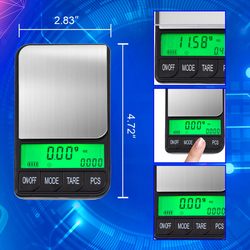
The display is one of the most important parts of a digital scale. Capacity and precision determine what a scale can measure, but the screen determines how easily you can understand the result. If the digits are small, the lighting is poor, or the active weighing unit is easy to miss, even a technically capable scale may feel inconvenient.
Color-changing LCD scales add another visual layer to the weighing experience. Instead of relying exclusively on small unit abbreviations or icons, certain models change the display color as the user moves between weighing modes. That visual distinction can make the active mode easier to recognize at a glance.
American Weigh Scales offers color-display pocket scales such as the MAX-150 and Predator-2KG. The Predator's bright LCD changes color for different weighing units, while the MAX-150 uses a backlit color-changing display to improve visibility in low-light conditions. Other AWS designs, including the BCM-150, use color-changing modes to make switching between units more intuitive.
Color is not a substitute for accuracy, proper calibration, or reading the unit label. It is a usability feature. When combined with clear digits, suitable contrast, responsive controls, and the correct scale specifications, it can help users identify modes faster and reduce avoidable reading mistakes.
This guide explains how color-changing LCD scales work, where they are most useful, what their limitations are, and how to choose the right model.
What Is a Color-Changing LCD Scale?
A color-changing LCD scale is a digital scale whose illuminated display changes color according to a mode, unit, function, or status defined by the manufacturer.
On some precision pocket scales, each weighing unit is paired with a different display color. As the user presses the MODE or UNIT button, both the unit abbreviation and the screen color change. Other scales may use color to indicate a particular operating state.
The exact color meanings are not universal. One model may assign a color to grams and another may use that same color for ounces. Always confirm the unit shown on the screen rather than relying on color alone.
A color-changing display typically includes:
-
An LCD panel that shows the numerical weight
-
A backlight that illuminates the digits and background
-
Multiple available backlight colors
-
Programming that links each color with a unit or mode
-
Standard unit labels such as g, oz, gn, ct, ozt or dwt
The weighing system underneath the display works like another digital scale. The load cell detects force, the electronics calculate weight, and the LCD presents the result. The color does not change the measurement itself.
Color-Changing LCD vs. Standard Backlit LCD
A standard backlit LCD uses one illumination color, often blue, green, amber, or white. Its main purpose is to improve visibility in low light.
A color-changing LCD can provide the same illumination benefit while also distinguishing among modes or units.
| Feature | Standard backlit LCD | Color-changing LCD |
|---|---|---|
| Illuminates digits | Yes | Yes |
| Helps in dim lighting | Yes | Yes |
| Uses one display color | Usually | No |
| Can visually distinguish units or modes | Usually not | On supported models |
| Changes scale accuracy | No | No |
| Replaces unit labels | No | No |
Both display types can be easy to read when they have large digits and strong contrast. The color-changing version adds a visual cue that some users find faster to recognize.
Why Display Color Can Make Readings Easier
Faster Recognition of the Active Unit
A precision scale may support six weighing units. The unit abbreviation can be small compared with the numerical result, especially on a compact pocket-scale display.
When each mode has a different background color, the user receives two signals:
-
The written unit abbreviation
-
The color associated with that mode
After repeated use, a familiar color can prompt the user to check the unit before recording a value. This is particularly useful when switching frequently between grams, ounces, carats, grains, troy ounces, and pennyweights.
Better Visibility in Dim Conditions
Backlighting illuminates the display so the digits remain visible when ambient light is limited. This can help at a workbench, coffee station, craft table, market booth, storage room, or travel location.
A bright display may also improve contrast when shadows fall across a small scale. It does not make every color equally readable in every environment, however. Glare, direct sunlight, viewing angle, and user vision can still affect clarity.
Quicker Status Checks
Color can help a user notice that something changed after a button was pressed. If the display switches color when the unit changes, the user receives immediate feedback that the input was registered.
This can make controls feel more responsive and reduce the chance of assuming the scale remained in the previous mode.
Lower Cognitive Load During Repetitive Tasks
When users weigh many similar items, they often focus on placing, removing, sorting, and recording. A distinctive display color can make mode recognition more automatic.
The user should still read the unit and result carefully. Color works best as a secondary cue, not as the only source of information.
A More Engaging User Experience
Practical tools do not have to feel dull. Color displays give compact scales a more modern, distinctive appearance and can make the interface feel more approachable.
That may seem cosmetic, but an interface people enjoy using is often an interface they pay attention to. Clear feedback can encourage better habits, including checking the mode before weighing.
Does a Color-Changing Display Improve Accuracy?
No. Display color does not make a scale more accurate or precise.
Accuracy depends on factors such as:
-
Load-cell design
-
Calibration
-
Readability
-
Stated tolerance
-
Maximum and minimum usable load
-
Surface stability
-
Item placement
-
Temperature
-
Air movement and vibration
-
Static electricity
-
Battery condition
-
Physical condition of the scale
The display communicates the result produced by the weighing system. A clearer interface can help prevent user errors—such as recording ounces as grams—but it cannot correct an improperly calibrated or overloaded scale.
When comparing scales, evaluate capacity, readability, accuracy specifications, calibration requirements, platform size, and intended application before treating the display as a deciding factor.
Understanding the Difference Between Accuracy and Readability
A color LCD may make a reading easier to see, but buyers should still understand what the displayed digits mean.
-
Capacity is the maximum total load the scale can support.
-
Readability is the smallest increment shown on the display.
-
Accuracy describes how close the result is to the true value.
-
Repeatability describes how consistently the same item produces the same result.
-
Tolerance describes the acceptable difference under defined conditions.
For example, a 150g x 0.01g scale can support up to 150 grams and displays hundredths of a gram. The two decimal places do not automatically guarantee that every result is accurate to exactly ±0.01g.
The screen can present information clearly only if the scale is used within its specifications.
AWS Color-Changing LCD Scale Examples
MAX-150 Digital Pocket Scale
The American Weigh Scales MAX-150 combines a compact design with a backlit color-changing LCD. It has a 150g capacity and 0.01g readability, making it suitable for lightweight objects that benefit from hundredth-of-a-gram detail.
Key specifications include:
-
Capacity: 150g
-
Readability: 0.01g
-
Units: g, oz, gn, ct, ozt and dwt
-
Platform: approximately 2.5 x 2.3 inches
-
Calibration: 100g weight, not included
-
Power: two AAA batteries, included
-
Stainless-steel weighing platform
-
Hard protective lid
The MAX-150 is a strong fit for jewelry, gemstones, coins, beads, compact precious-metal items, small craft components, and other lightweight objects.
Its main limitation is capacity. The container and item together must remain below 150g. For heavier loads, users should select a higher-capacity model rather than risking overload.
Predator-2KG Rechargeable Pocket Scale
The Predator-2KG pairs a much higher capacity with a bright LCD that changes color for different weighing units.
Key specifications include:
-
Capacity: 2kg / 2,000g
-
Readability: 0.1g
-
Units: g, oz, gn, ct, ozt and dwt
-
Platform: approximately 3.15 x 3.11 inches
-
Calibration: 1kg weight, not included
-
Rechargeable lithium-ion power
-
Portable pocket-scale design
The Predator is better suited to users who need substantially more capacity while retaining tenth-of-a-gram readings. It can accommodate coffee, ingredients, larger coin groups, hardware, craft supplies, and small household items.
Compared with the MAX-150, the Predator sacrifices one decimal place of gram readability in exchange for more than thirteen times the capacity.
BCM-150 Clear Blue Pocket Scale
The BCM-150 is another compact AWS model that uses color-changing modes to make unit switching more recognizable. Its removable lid protects the scale and can also function as a weighing tray.
This type of design is useful for users who want a small travel-friendly scale with an interface that gives obvious feedback when the weighing mode changes.
Product specifications and color behavior can vary by version, so users should verify the current product listing and manual before purchase.
MAX-150 vs. Predator-2KG
| Feature | MAX-150 | Predator-2KG |
| Capacity | 150g | 2,000g |
| Readability | 0.01g | 0.1g |
| Best advantage | Finer precision | Much higher capacity |
| Units | g, oz, gn, ct, ozt, dwt | g, oz, gn, ct, ozt, dwt |
| Power | Two AAA batteries | Rechargeable lithium-ion battery |
| Best for | Jewelry, gemstones, coins, tiny components | Coffee, ingredients, crafts, hardware, larger items |
Choose the MAX-150 when hundredth-of-a-gram readability matters and the total load remains below 150g. Choose the Predator-2KG when capacity is more important and 0.1g readings are sufficient.
Best Uses for Color-Changing LCD Scales
Jewelry and Gemstones
A color display can make it easier to notice when the scale changes among grams, carats, troy ounces, and pennyweights. This matters because the same numerical value can represent very different quantities depending on the active unit.
Choose a model with sufficient readability for the smallest piece and enough capacity for the item plus its container. Weight alone cannot confirm authenticity, purity, grade, or value.
Coin Collecting and Precious Metals
Collectors may switch between grams, ounces, troy ounces, and pennyweights. A color cue can make the active mode more noticeable while comparing coins, rounds, and compact precious-metal pieces with reference specifications.
Production tolerances, wear, dirt, and damage can change an individual coin's weight, so mass should be considered alongside other identification methods.
Coffee and Espresso Dosing
A bright display is convenient at coffee stations where shadows, dark countertops, or early-morning lighting can make small digits harder to see. A color change can also draw attention if the unit is switched accidentally.
For espresso, 0.1g readability is commonly practical. Confirm that the dosing cup or portafilter fits securely and remains within capacity. Users who time extraction on the scale may prefer a coffee-specific model with a timer.
Crafts and Hobbies
Beads, pigments, wax, resin additives, model-making pieces, and small hardware often require repeatable measurements. The color display can help users verify the active unit before following a formula or recording a batch.
Always follow the material manufacturer's safety and mixing guidance. If a project requires finer precision than the scale provides, select a more appropriate model rather than estimating between increments.
Small Parts and Inventory
For repetitive sorting and comparison, a clear display can reduce the time required to confirm each reading. If piece counting is important, choose a model that specifically includes a counting function; a color-changing screen alone does not imply counting capability.
Travel and Mobile Work
Compact color-display scales can be useful at shows, markets, studios, workshops, coffee events, or temporary workspaces. Protective covers and battery or rechargeable power support portability.
After transportation, allow the scale to reach room temperature, place it on a stable surface, confirm zero, and check calibration when required.
Color Is a Secondary Cue, Not a Replacement for Text
Users should never rely on color alone to identify a unit or determine whether a reading is safe to use.
There are several reasons:
-
Color assignments differ among models.
-
A user may forget which color represents which unit.
-
Color vision varies.
-
Bright ambient light can wash out the backlight.
-
Low batteries may reduce display brightness.
-
Viewing angle may change perceived color or contrast.
-
A mode may change without the user noticing the transition.
Always read the written unit abbreviation beside the number. Treat color as an additional confirmation.
This design principle is particularly important when measurement errors could affect cost, quality, safety, or compliance.
Accessibility Considerations
A color-changing LCD may improve recognition for some users, but accessibility depends on more than color.
Look for:
-
Large, clearly formed digits
-
Strong contrast between digits and background
-
Written unit labels
-
A wide, readable viewing angle
-
Controls with distinct labels
-
A display that remains visible in both bright and dim conditions
-
Audible or tactile feedback if needed and available
Color-dependent interfaces can be difficult for users with color-vision differences. The strongest design combines color with text, symbols, position, or another non-color cue.
If easy reading is a priority, examine the display dimensions and product photos rather than assuming every color LCD will be equally legible.
How Lighting Affects a Color LCD
Dim Rooms
Backlighting generally provides its greatest advantage in low ambient light. The illuminated background helps separate the digits from the display.
Bright Sunlight
Direct sunlight can create glare or reduce the visible effect of the backlight. Shade the display or move to an indoor or indirect-light location when possible.
Viewing Angle
Some LCDs lose contrast when viewed sharply from the side or above. Position the scale so the display faces the user directly and make sure a bowl or container does not block it.
Reflective Work Surfaces
Glass, polished stone, and stainless steel may reflect light toward the screen. Adjust the scale's position without moving it during an active measurement.
Does a Color-Changing Display Use More Battery?
Any backlight consumes power. The practical effect depends on the display design, brightness, battery type, auto-off settings, and how long the light remains active.
To preserve battery life:
-
Turn off the scale when it is not in use.
-
Use the backlight controls if the model allows adjustment.
-
Avoid repeatedly waking the scale unnecessarily.
-
Replace weak disposable batteries as a complete matching set.
-
Charge rechargeable models according to the instructions.
-
Store the scale within the recommended temperature range.
Choose a rechargeable model if frequent use makes disposable battery replacement inconvenient. Choose standard-battery power if simple field replacement is more important.
How to Choose a Color-Changing LCD Scale
1. Start With Capacity
Estimate the heaviest total load, including the bowl, tray, or container. Choose capacity above that value so you do not routinely work at the limit.
Tare resets the visible number but does not remove container weight from the load cell.
2. Select the Required Readability
Use 0.1g readability for many coffee, food, craft, coin, and component tasks. Choose 0.01g when hundredth-of-a-gram detail is genuinely necessary. Choose 0.001g only when milligram-level readings are required and you can control drafts, vibration, temperature, and static.
3. Confirm the Weighing Units
Not every scale supports the same modes. Depending on the application, you may need:
-
Grams (g)
-
Standard ounces (oz)
-
Grains (gn)
-
Carats (ct)
-
Troy ounces (ozt)
-
Pennyweights (dwt)
Check the exact model rather than assuming that a color display includes all six.
4. Understand What the Colors Indicate
Confirm whether colors correspond to weighing units, operating modes, limits, or another status. Review the manual so the visual cues are meaningful rather than decorative.
5. Check Display Size and Contrast
A large single-color display may be easier to read than a tiny multicolor screen. Compare digit size, backlight brightness, unit-label visibility, and viewing angle.
6. Examine Platform Size
The item should sit securely in the center without touching the housing, counter, display, or another object. A large container that blocks the screen defeats the benefit of a clear LCD.
7. Review Calibration Requirements
Check whether the scale supports user calibration, which reference weight is required, and whether that weight is included.
8. Choose the Right Power Source
Disposable batteries are easy to replace. Rechargeable lithium-ion power can be more convenient for frequent use. Some bench scales also support an AC adapter.
9. Consider Protection and Portability
A durable cover helps protect a pocket scale's platform and load cell during storage. Some covers double as weighing trays. Never let a cover or tray touch the surrounding surface during measurement.
10. Compare Warranty and Support
Reliable instructions and accessible product support matter when you have questions about display modes, calibration, error codes, or replacement parts.
How to Get More Reliable Readings
The color display makes results easier to interpret, but correct technique determines their usefulness.
-
Place the scale on a hard, flat, level surface.
-
Keep it away from drafts, fans, vibration, and strong electronics.
-
Allow it to reach room temperature after transportation.
-
Turn it on with the platform empty.
-
Wait for the display to show zero.
-
Confirm the written unit and color mode.
-
Center the item on the platform.
-
Wait for the reading to stabilize.
-
Use tare only after the empty container settles.
-
Stay within maximum capacity.
-
Replace or recharge weak batteries.
-
Calibrate according to the exact model instructions.
If the display fluctuates, fix the environment before assuming the scale needs calibration.
Common Misconceptions About Color LCD Scales
“A Color Screen Means the Scale Is More Accurate”
Color is an interface feature. Compare accuracy and repeatability specifications separately.
“Every Brand Uses the Same Colors for the Same Units”
Color assignments are model-specific. Read the unit abbreviation every time.
“The Display Color Warns Me Before Overload”
Only if the model explicitly includes that behavior. Most scales use a written error code such as O-Ld for overload.
“Two Decimal Places Guarantee Exact Hundredth-Gram Accuracy”
Decimal places indicate readability, not a universal accuracy guarantee. Review tolerance and minimum-load information.
“Backlighting Makes the Scale Easier to Read Everywhere”
It helps in many conditions, especially low light, but glare and direct sunlight can still reduce visibility.
Frequently Asked Questions
What is a color-changing LCD scale?
It is a digital scale whose illuminated screen changes color according to a unit, mode, or status programmed by the manufacturer. The display still shows a written numerical result and unit abbreviation.
Why does my digital scale change colors?
On many color-display pocket scales, each color identifies a different weighing unit or mode. Consult the model manual because the meanings are not universal.
Does the screen color affect the measurement?
No. The color changes how information is presented, not how the load cell measures weight.
Are color-changing scales more accurate?
Not inherently. Accuracy depends on scale design, calibration, tolerance, environment, power, and handling.
Are color LCD scales easier to use?
They can be, especially when users frequently change units or work in dim lighting. Clear digits and written unit labels remain essential.
Are they suitable for users with color-vision differences?
That depends on the individual and display design. Color should be paired with unit text or symbols. Users should never need color alone to interpret a reading.
Is the AWS MAX-150 a color-changing scale?
Yes. American Weigh Scales describes the MAX-150 as having a backlit color-changing LCD. It has a 150g capacity and 0.01g readability.
Which AWS scale changes color for each weighing unit?
The Predator-2KG product information states that its bright LCD changes color for each unit. It supports g, oz, gn, ct, ozt and dwt.
Do color-changing displays drain batteries faster?
A backlight uses power, although the real battery impact varies by model, brightness and usage. Turning the scale off when finished helps conserve power.
Can I turn the color display off?
It depends on the model. Some scales offer backlight settings, while others activate the display color automatically. Check the manual for the exact controls.
What should I prioritize: color display or precision?
Choose capacity, readability, accuracy, minimum load and platform size first. Then use display style to distinguish between models that already meet the technical requirements.
Final Thoughts: Are Color-Changing LCD Scales Worth It?
Color-changing LCD scales can make digital weighing more intuitive. The changing background adds a noticeable visual cue when the unit or mode changes, while the backlight keeps digits visible in dim conditions.
The feature is most valuable for users who switch regularly between weighing units, work in variable lighting, or simply want faster confirmation that a button press changed the active mode. AWS models such as the MAX-150 and Predator-2KG combine color displays with different balances of capacity and readability, giving buyers a choice between finer precision and higher capacity.
Color should never replace the written unit, appropriate calibration, or correct weighing technique. It does not increase accuracy and cannot compensate for an unstable surface, overload, weak batteries, or the wrong scale specification.
Choose the scale for its capacity, readability, platform, units, and intended use first. When those essentials are right, a color-changing LCD can make every reading faster to recognize and easier to understand at a glance.