
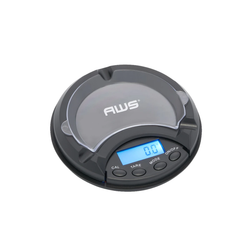
To calibrate a digital scale, first place it on a hard, flat and stable surface with nothing touching the weighing platform. Turn the scale on and allow the display to stabilize at zero. Next, enter calibration mode using the instructions for your exact model. When the scale displays the required calibration mass, place the correct calibration weight in the center of the platform and wait for the scale to confirm that calibration is complete.
The basic process is:
-
Place the digital scale on a stable, level surface.
-
Make sure the weighing platform is clean and empty.
-
Check that the batteries or power supply are working correctly.
-
Turn the scale on and allow it to stabilize.
-
Confirm that the unloaded display reads zero.
-
Enter calibration mode according to the manufacturer's instructions.
-
Wait for the required calibration weight to appear on the display.
-
Place the correct calibration weight in the center of the platform.
-
Wait for a confirmation such as PASS, END, or another model-specific message.
-
Remove the calibration weight and allow the scale to return to zero.
-
Test the scale again with an appropriate known reference.
The exact button sequence and calibration weight vary by digital scale. A 500g-capacity scale, for example, does not necessarily require a 500g calibration weight. Always use the calibration mass and procedure specified for the exact model.
Add this FAQ as well
How Do You Calibrate a Digital Scale Without a Calibration Weight?
For most digital scales that use external calibration, you need an appropriate known calibration weight. Simply pressing tare, resetting the scale or placing a household object on the platform is not equivalent to proper calibration.
Some higher-end scales may have an internal calibration system, but that feature must be built into the instrument.
How Do You Know If a Digital Scale Needs Calibration?
A calibration check may be appropriate when:
-
A suitable known reference consistently gives an unexpected reading.
-
The scale has been transported or moved significantly.
-
It has experienced a major temperature change.
-
The scale was overloaded or subjected to an impact.
-
Measurements appear consistently high or low.
-
Your quality procedure requires periodic calibration or verification.
-
The manufacturer recommends calibration.
Before recalibrating, first rule out drafts, vibration, weak batteries, an unstable surface and material interfering with the weighing platform.
How Do You Calibrate a Digital Scale With Weights?
Check the manual to determine the exact calibration mass required. Enter calibration mode and wait until the scale requests the reference weight. Place the appropriate calibration weight gently in the center of the platform and wait for the calibration routine to complete.
Do not assume the calibration mass must equal the maximum capacity of the scale.
How Do You Calibrate a 500g Digital Scale?
A 500g scale should be calibrated according to its specific instructions. Some 500g-capacity models may request a 500g reference, while others may use 200g or another value.
The 500g specification describes maximum capacity, not necessarily the required calibration mass.
How Do You Calibrate a Digital Pocket Scale?
Place the pocket scale on a solid surface, eliminate vibration and airflow, verify that the platform is clean, turn the scale on, allow it to stabilize and then enter calibration mode according to the manufacturer's instructions. Add the specified calibration weight only when prompted.
Because pocket scales are frequently transported, checking their performance after significant movement can be especially useful.
How Do You Calibrate a Digital Scale That Has No CAL Button?
A dedicated CAL button is not required for every scale. Some models enter calibration through the MODE, UNIT, TARE or another button combination.
There is no universal button sequence. Check the instructions for your exact model rather than using a calibration sequence intended for another scale.
How Do You Calibrate a Digital Scale That Keeps Giving Different Readings?
Do not immediately assume calibration is the problem.
First check for:
-
Airflow
-
Vibration
-
Weak batteries
-
Temperature changes
-
Static
-
Unstable surfaces
-
Platform interference
-
Overloading
If the weighing environment is stable and an appropriate known reference still produces consistently incorrect results, then follow the model-specific calibration procedure.