
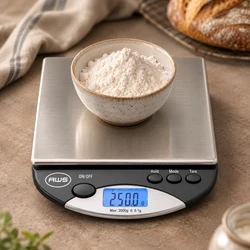
If your digital scale suddenly shows ounces instead of grams, the unit setting may have changed. An accidental button press or a saved setting can make the same object display a very different number without changing the underlying measurement.
Check the unit symbol before calibrating the scale. Switching from grams to ounces, carats, or grains changes how the weight is expressed; it does not necessarily indicate a fault.
Your model’s American Weigh Scales product manual identifies the supported units, control buttons, and startup behavior.
Why Does a Digital Scale Change Units?
Common explanations include:
- The unit button was pressed accidentally.
- The scale retained the last unit used.
- Another user selected a different unit.
- A shared button activated a secondary function.
- The instrument entered a different operating mode.
- The model returned to its default setting after a restart or power interruption.
Behavior varies by model. For example, the AWS-Series manual describes changing units with the MODE key and retaining the last selected unit after switching off. Do not assume every scale follows that sequence.
The AWScales product FAQ provides additional background on weighing units and controls.
Identify the Symbol Before Reading the Number
Small unit indicators can be easy to overlook, especially on a compact display.
| Display symbol | Meaning | Important distinction |
|---|---|---|
| g | Gram | Different from grain |
| kg | Kilogram | 1 kg equals 1,000 g |
| mg | Milligram | 1,000 mg equals 1 g |
| oz | Usually avoirdupois ounce | Different from a troy ounce |
| ozt or oz t | Troy ounce | Commonly used for precious metals |
| ct | Metric carat | Mass unit used for gemstones |
| gn | Grain | Different from gram |
| dwt | Pennyweight | A troy-system mass unit |
| lb | Pound | Often shown alone or in a combined mode |
Symbols and available modes vary. Check the manual rather than interpreting an unfamiliar abbreviation by appearance.
The NIST conversion tables provide authoritative conversion factors for these measurement units. NIST
How to Change a Digital Scale Back to Grams
1. Return to Normal Weighing Mode
Remove the load and let the scale complete startup.
If the screen shows a calibration prompt, counting mode, or another unfamiliar indicator, follow the manual to return to normal weighing. Do not enter undocumented button combinations.
2. Find the Unit Control
The control may be labeled MODE, UNIT, UNITS, or M. Some models use a shared button or a selector beneath the housing.
Follow the instructions for your model. A short press and a long press may perform different functions.
3. Select the Intended Symbol
Cycle through the supported units until the required symbol appears.
For grams, confirm g. For grains, confirm gn. These are not interchangeable.
Do not assume that milligram readability means the scale has a separate mg display mode. A model may display measurements in grams to three decimal places.
4. Check What Happens After Restarting
Switch off and restart the scale according to the manual.
Observe whether it retains the selection or returns to a default. If the behavior matches the instructions, the scale is operating as designed.
Use the AWScales knowledge center for additional weighing terminology and conversion resources.
Common Unit Mix-Ups
Ounces Versus Troy Ounces
An avoirdupois ounce and a troy ounce are different masses.
| Unit | Approximate equivalent |
|---|---|
| 1 avoirdupois ounce | 28.3495 g |
| 1 troy ounce | 31.1035 g |
The Royal Mint’s explanation of the troy ounce describes this distinction. Selecting oz when a task requires ozt produces a different numerical result. The Royal Mint
Grams Versus Grains
A grain is much smaller than a gram:
1 grain = 0.06479891 g
Check whether the display shows g or gn. NIST’s general tables of measurement units document the relationships between metric and customary mass units. nist.gov
Carats Versus Grams
One metric carat equals 0.2 g.
Therefore, a 1 g object corresponds to 5 ct. A display changing from approximately 1.00 g to 5.00 ct can be a normal conversion, subject to the model’s rounding.
GIA’s carat-weight guide confirms the metric carat relationship. Carat weight is also different from karat, which describes gold purity. gia.edu
Milligrams Versus Decimal Grams
These represent the same mass:
0.025 g = 25 mg
The leading zero and decimal point matter. Read the number and unit together rather than treating every displayed digit as milligrams.
Does Changing Units Make the Scale More Accurate?
No. Changing units converts the measurement into another expression.
The number of displayed decimal places may change, but the instrument’s underlying performance does not automatically improve.
NIST’s guide to uncertainty for balances and scales explains why evaluating a result involves more than display resolution. www.nist.gov
A small difference between converted displays can also reflect rounding.
What If the Unit Button Does Not Work?
Check the following before assuming the control is damaged:
| Symptom | Next check |
|---|---|
| Unit does not change | Confirm the correct control and press duration |
| Desired unit never appears | Check whether the model supports it |
| Button switches off the scale | Review shared-button operation |
| Unit symbol is incomplete | Investigate a display problem |
| Scale resets during operation | Check the specified power supply |
| Reading remains incorrect in the right unit | Test with an appropriate reference weight |
If power symptoms appear, install the specified fresh batteries. Energizer’s battery-care guidance recommends using the correct type and avoiding mixed old and new cells. energizer.com
Consult the AWScales support FAQs for further operating questions.
Should You Calibrate a Scale Showing the Wrong Unit?
Correct the unit setting first.
Calibration does not change ounces into grams or add an unsupported unit. If the scale produces repeatable but incorrect results after selecting the intended unit, follow the model’s reference-weight checks and adjustment instructions.
The AWScales calibration guide provides general background. Use the exact procedure and calibration weight specified for your model.
Frequently Asked Questions
Why does my scale keep starting in ounces?
It may retain the last unit used or have a default startup setting. Check the manual and test the documented selection procedure.
Can every digital scale display grams?
No. Supported units vary by model.
Why does the number change so much when I press MODE?
The scale may be converting the same mass into another unit. Check the symbol beside the number.
Does tare change the unit?
Tare normally subtracts a reference load. If the unit changes when you press a control, check whether the button has multiple functions.
When should I contact support?
Contact American Weigh Scales support if a supported unit cannot be selected or the display behaves differently from the manual. Include the model number, current symbol, desired unit, and the button action you tried.